Home · Portfolio trackers · Google Finance
Google Finance portfolios were rebuilt in June. Most guides describe the old one
Short answer
Sign in at google.com/finance and find Portfolios in the left panel. Since the June 2026 rebuild there is no form to fill in: you either upload a file from your broker or describe your holdings in plain words, and Google builds the portfolio for you. Describe them without a purchase price and you get a portfolio that tracks value but cannot calculate a return, which is the one thing worth knowing before you start. What it still will not do is sync with your broker, track cash and bonds, or tell you what your broker is charging you.
What changed in June 2026. Google Finance came out of beta on 25 June 2026, rolled portfolios out globally, and launched an Android app. Guides published before that date describe a different product, so check the date on anything else you read.
The fast way: upload instead of typing
This is the part of the rebuild worth knowing about, because it removes the single biggest reason people abandon portfolio trackers.
Existing portfolios carry over automatically, and a new one can be created by dropping in screenshots or uploading files such as CSVs or PDFs that detail your holdings. Google also states that you can simply describe your investments to get started and build from there.
Most brokers export a CSV of your positions in a couple of clicks. That file is the fastest route in, and it removes the twenty minutes of manual entry that usually kills the exercise before it starts.
On privacy, Google states that portfolio data is kept private, that it does not retain files or images you upload, and that you can edit or delete portfolio data at any time.
How to create a portfolio in Google Finance
Checked in the product on 15 August 2026. Sign in with a Google account and go to google.com/finance. Portfolios sit in the left panel, under Lists, above the watchlist. If you have never made one, the panel shows a single Create portfolio button.
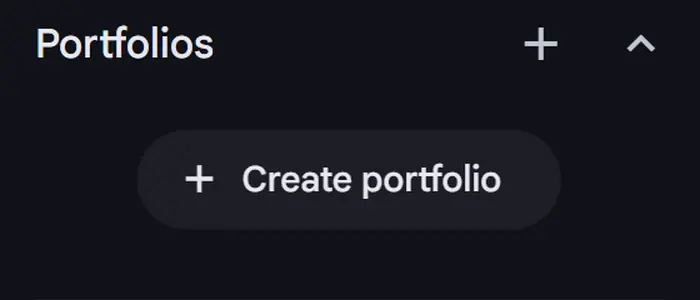
There is no form. This is the part every older guide gets wrong, including the earlier version of this page. Selecting Create portfolio does not open a field where you type a symbol and a share count. It offers exactly two routes, and both of them hand the work to Google's model rather than to you.
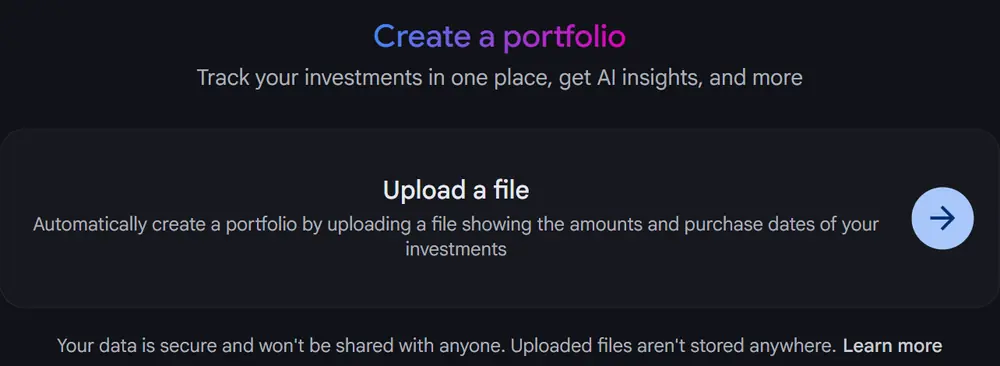
- Upload a file. Select the arrow beside Upload a file and pick an export from your broker. The file picker offers only Custom Files and All Files, so Google publishes no list of accepted formats. Its own description asks for a file showing the amounts and purchase dates of your investments, which describes content rather than a format.
- Or describe it in words. Below the upload card is a text box reading Or describe what is in your portfolio. Typing something as plain as 10 shares of Apple bought in January 2025 is enough. Google creates the portfolio, resolves the ticker, and names the portfolio for you.
On privacy, the create screen states that your data is secure and won't be shared with anyone and that uploaded files aren't stored anywhere.
The trap: a portfolio with no purchase price
Describing your holdings in words works, and it produces a portfolio in seconds. It also produces an incomplete one, in a way that is easy to miss.
We created a portfolio from the sentence above and then opened the Transactions tab. The transaction was recorded with the share count and nothing else.

The consequence shows up on the Investments tab, where total gain or loss read +$3,059.30 (0.00%). The dollar figure equals the entire value of the position, because the cost basis was treated as zero, while the percentage correctly refused to compute. Two numbers on one row, one of them meaningless, and nothing on the row says so.
Google does flag this, to its credit, in the text of the reply that creates the portfolio. It states that because a specific purchase date and price were not provided, the chart shown is a hypothetical backtest of your current holdings and should never be presented as actual historical portfolio performance, and that adding the exact purchase date and cost per share unlocks the full experience. That is a clearer warning than most paid research products give about their own charts. It is also a paragraph above a big green number, and people read the number.
What to do about it. If you care about return rather than current value, give the price when you create the portfolio. 10 shares of Apple bought on 15 January 2025 at $232 a share costs you nothing extra to type and produces a portfolio that can actually calculate a gain.
Can you use Google Finance portfolios without the AI?
People search for this, and the honest answer is no. Checked in the product on 15 August 2026, there is no setting, no toggle and no legacy view that lets you build or edit a portfolio through a normal form.
The AI is not a feature sitting on top of the portfolio. It is the way you interact with it. Creating one offers a file upload or a text box reading Or describe what is in your portfolio. Editing one opens a panel reading Describe the changes to make. Both routes run through the model, and there is no third route.
What you can do is limit how much it decides for you. Upload a file rather than describing your holdings, because a file carries the dates and prices explicitly and leaves less to be inferred. If you do describe them in words, state the purchase date and the price per share in the same sentence, which is the difference between a portfolio that tracks value and one that can also calculate a return.
Once the portfolio exists, the rest of the page behaves normally. The Investments, Insights and Transactions tabs are ordinary tables, the chart is an ordinary chart, and nothing forces you to read the generated commentary. The AI is unavoidable at the point of entry and easy to ignore afterwards.
If that is a dealbreaker, the practical alternatives are Yahoo Finance, which still uses conventional forms, or a spreadsheet you control entirely.
How to edit or delete a portfolio
Open the portfolio and select Edit at the top right. Three options appear.
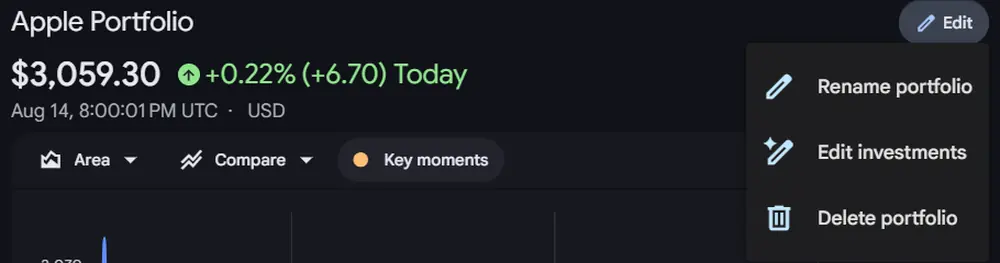
- Rename portfolio changes the name Google generated for you.
- Edit investments opens the research panel on the right with a box reading Describe the changes to make. Editing is conversational too, not a form.
- Delete portfolio removes the whole thing.
Individual holdings carry a three dot menu at the end of their row on the Investments tab. A portfolio page also carries three tabs: Investments, Insights, and Transactions, the last of which is where purchase dates and prices are recorded and therefore where you can check whether yours are actually there.
If your portfolio has disappeared
A common search, and worth addressing plainly. Two things are worth checking before assuming the data is gone.
First, portfolios are in the left panel rather than on the main page, and the main Google Finance landing view can be scrolled a long way without ever showing them. Second, and stranger: on 15 August 2026 we loaded google.com/finance/beta from Israel and got a page with no portfolio section at all. Adding the parameters ?hl=en&gl=US to the same address returned the full interface with portfolios present. We have not tested enough regions to say what governs this, so we are reporting the observation rather than the rule. If your portfolios are missing, that parameter is worth trying before you conclude anything.
Adding an index for comparison
You can add an index to a portfolio to see how you are doing against it. Worth knowing: the index does not contribute to your portfolio returns, so it sits alongside your holdings as a benchmark rather than distorting the total.
What the AI layer does
The rebuild added a research tool that answers questions about your own holdings in plain language. Google's examples include asking which sectors are currently underrepresented in your portfolio, and how a fixed income allocation affects long term growth potential. You can also describe a recurring task, such as a daily pre-market briefing on overnight moves, and be notified through the Google app. Paid tools have been shipping the same idea, and we ran a live accuracy check on one of them: see what happened when we tested its answers against what the platform itself displayed.
Read the disclaimer that comes with it. Google states that Google Finance does not provide personalized financial, investment, tax or legal advice, and that AI-generated summaries and insights are synthesized from third-party sources and provided for informational purposes only. Treat the output as a starting point, not an answer.
Three things it still will not do
1. It does not sync with your broker
There is no automatic brokerage connection. Uploading a file is faster than typing, but it is still a snapshot. Trades you make after the upload will not appear until you add them, which means the portfolio drifts out of date unless you keep feeding it.
2. Cash and bonds have nowhere to sit
Coverage is built around listed securities. Stocks, ETFs, funds and many cryptocurrencies work by symbol. Cash balances and individual bonds do not, which matters more than it sounds, because uninvested cash is where a large part of your real cost is hiding, as our broker cost comparison and our Interactive Brokers fee breakdown both set out.
3. Portfolios are not fully on mobile yet
Google states that portfolios, agentic tasks and live earnings call streaming are currently exclusive to the web experience and will roll out to mobile in future updates, with iOS support described as coming soon. An Android app exists, but if you check your holdings from a phone, this is a real limitation today.
Google Finance, Yahoo Finance and a spreadsheet
| Google Finance | Yahoo Finance | Spreadsheet | |
|---|---|---|---|
| Setup by file upload | Yes | CSV import | Manual |
| Live prices | Yes | Yes | Yes |
| Dividends tracked automatically | No | Yes | Manual |
| Cash and bonds | No | Yes | Yes |
| Sector view | AI answers | Key Metrics | Yes |
| Full mobile access | Rolling out | Yes | Yes |
| Annual cost of your broker | No | No | Yes |
| Who holds the data | Yahoo | You |
Google features and disclaimers from Google's own product blog and Search Help, checked 3 August 2026. Yahoo features from Yahoo Finance help documentation. Products change, so verify before relying on any single row.
If dividends matter to you, Yahoo Finance still handles them without any input from you, which Google does not.
If you want the fastest start, Google now wins on entry: upload a file and you are done in a minute. If you want dividends handled for you, Yahoo is still ahead. And if you want to know what the whole arrangement is costing you every year, none of the free trackers will tell you, because that number is not in their interest to show.
There is a second gap none of them tries to close. A tracker tells you what you own and what it is worth today. None of them tells you whether that price is reasonable, because valuation is a different job and it needs data these tools do not carry. That is what a paid research platform sells, and whether it is worth paying for is a separate question we tested properly: what a paid research tool actually adds, from one logged-in session with the screenshots to show it.
The one number no free tracker will calculate
Our Google Sheets tracker holds your positions with live prices and sector allocation, and adds a tab that turns commissions, platform charges and currency conversion into a single annual figure. Free, no signup wall, and it lives in your own Drive.
Get the spreadsheetWorks on any device today, including phones. Prices come through Google Finance and can be delayed up to 20 minutes.
Frequently asked questions
- Is the Google Finance portfolio tracker free?
- Yes. A Google account is all that is required. Portfolios rolled out globally in the new Google Finance in June 2026 and there is no paid tier for tracking.
- Does Google Finance sync with my broker?
- No. There is no automatic brokerage connection. What the June 2026 rebuild added instead is the ability to create a portfolio by uploading a CSV or PDF of your holdings, dropping in a screenshot, or simply describing your investments in words.
- Can I use Google Finance portfolios on my phone?
- Not yet in full. Google states that portfolios, agentic tasks and live earnings call streaming are currently exclusive to the web experience and will roll out to mobile in future updates. An Android app launched in June 2026 and iOS support is described as coming soon.
- Can Google Finance track cash and bonds?
- Not directly. Coverage is built around listed securities, so stocks, ETFs, funds and many cryptocurrencies work by symbol. Cash balances and individual bonds do not have a clean home, which matters if a meaningful share of your money is sitting uninvested.
- What does the AI in Google Finance actually do?
- It answers questions about your holdings in plain language, such as which sectors are underrepresented in your portfolio. Google states the insights are synthesized from third-party sources and are informational only, and that Google Finance does not provide personalized financial advice.
- Is my Google Finance portfolio data private?
- Google states that portfolio data is kept private, that it does not retain files or images you upload, and that you can edit or delete your portfolio data at any time.
- Does Google Finance show what my broker charges me?
- No. Neither Google Finance nor Yahoo Finance totals commissions, platform charges or currency conversion into an annual cost. It remains the largest number in retail investing that no free tracker will calculate for you.
- How do I edit a holding in Google Finance?
- Open the portfolio and select Edit at the top right. The menu offers Rename portfolio, Edit investments and Delete portfolio. Edit investments opens a panel with a box reading Describe the changes to make, so editing is conversational rather than a form. Individual holdings also carry a three dot menu at the end of their row on the Investments tab. Checked 15 August 2026.
- Why does my Google Finance portfolio show a gain of 0.00%?
- Because no purchase price was recorded. If you create a portfolio by describing it in words without naming a price, Google stores the share count and leaves the transaction date, price and amount blank. The total gain in dollars then equals the entire value of the position, since the cost basis is treated as zero, while the percentage correctly refuses to compute. Add the purchase date and cost per share to fix it. Checked 15 August 2026.
- Can I use Google Finance portfolios without the AI?
- No. Checked on 15 August 2026, there is no setting or legacy view that restores a conventional form. Creating a portfolio offers a file upload or a text box that reads Or describe what is in your portfolio, and editing opens a panel that reads Describe the changes to make. Both run through the model. You can limit what it infers by uploading a file rather than describing holdings, and by stating the purchase date and price per share if you do describe them. After the portfolio exists, the tabs and charts are ordinary and the generated commentary can be ignored.